
Model Loading
LyRuno loads models in three ways: manually (download the files and set the model path in settings), automatically (downloaded online when missing locally), or built in with the installer.
LyRuno supports three loading methods: Manual, Automatic, and Built-in. When switching models, LyRuno will detect whether the corresponding model already exists locally. If it exists, it will be used directly; otherwise, it will be automatically downloaded online. If the online loading fails, please check your network environment and try again, or use the Manual Loading method.
Manual Loading
- Download all model files manually (choose one of the following methods):
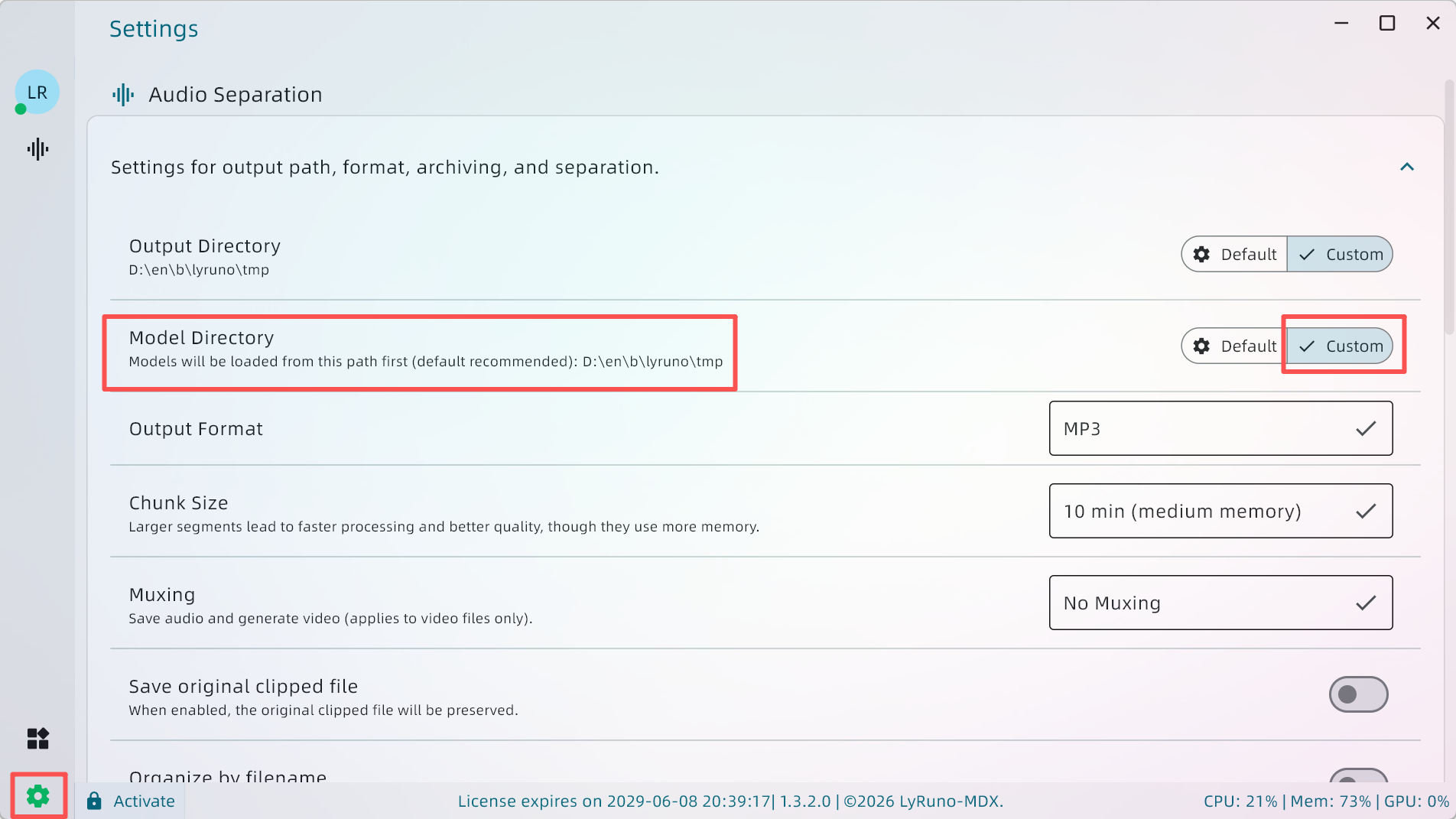
- Find the model path configuration item on the settings page and select the path where the model downloaded in the previous step is located. Refer to the image below:
Automatic Loading
- When the model file cannot be found locally, it will be automatically downloaded online.
- If loading fails, please check the network environment, click retry, or choose the manual loading method.
Built-in Models
- Built-in models are included in the software installation package and do not need to be downloaded separately.
Backup
Backup download options when the main site is unavailable: get the LyRuno packages from Google Drive or Mega.
FAQ
Answers to common LyRuno questions: Free vs. Pro, how to buy and activate a license, whether an internet connection is required, license binding, GPU requirements, and choosing between CPU and GPU builds.
Last updated: Nov 3, 2026